Flooring Calculator: Room Areas, Allowance & Boxes
Combine room areas, apply your chosen allowance once and round the combined order to whole flooring boxes.
Worked project: three rooms, one box order
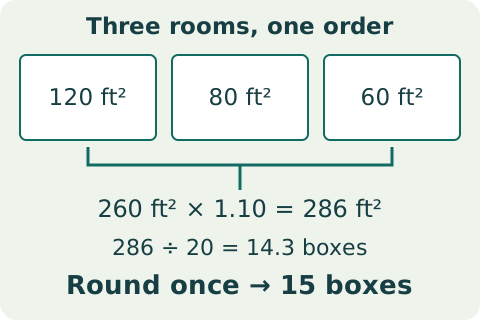
- Enter Multiple room areas: 120, 80, 60, and choose Feet / square feet. Combined net area = 120 + 80 + 60 = 260 ft².
- For this illustration, choose a 10% allowance: 260 × 1.10 = 286 ft². The 10% is an example input, not a universal recommendation.
- At 20 ft² per box, 286 ÷ 20 = 14.3. Round the combined order up once to 15 boxes, covering 300 ft². That is 40 ft² more than the net floor area, including the chosen allowance and whole-box rounding.
Keep the scope clear: Use the same area unit for every room and the box coverage. Do not add the allowance separately to each room and then add it again to the total. This calculator does not optimize cuts, reuse offcuts, plan board direction or guarantee enough material for a particular layout; choose an allowance with the product and installation requirements in mind.
To reproduce this project, enter the values in the steps above. Reset to example values restores the calculator’s separate default example.
How this works
Add all room areas, apply waste once, divide by box coverage in the same area unit, and round up.
Example
Using the example inputs, flooring order is 7 boxes.
- Length
- 12 selected length unit
- Width
- 10 selected length unit
- Waste allowance
- 10 %
- Coverage per box
- 20 selected square unit
- Price per box
- 0 USD
- Area input
- Single rectangle
- Room areas, comma-separated (used for multiple rooms)
- 120, 80, 60
- Measurement system
- Feet / square feet
- Flooring order
- 7 boxes
Use the selected square-area unit for both room areas and box coverage.
Scope and assumptions
Does not optimize room-by-room cuts; use an appropriate allowance for layout and product.
Related quantity-calculation reference